Elevate Your Online Course Marketing with V-19 Banners
In the crowded digital marketplace of online education, your visual first impression is often your only chance to capture a potential student's attention. A generic, text-heavy advertisement simply won't cut through the noise. This is where strategic design meets practical application, and having the right tools can transform your marketing from forgettable to compelling. The Online Courses Banner Design V-19 package is built for this exact purpose, offering a comprehensive set of professional templates to make your social media and web pages look polished and effective immediately.
A Complete Toolkit for Digital Marketers and Course Creators
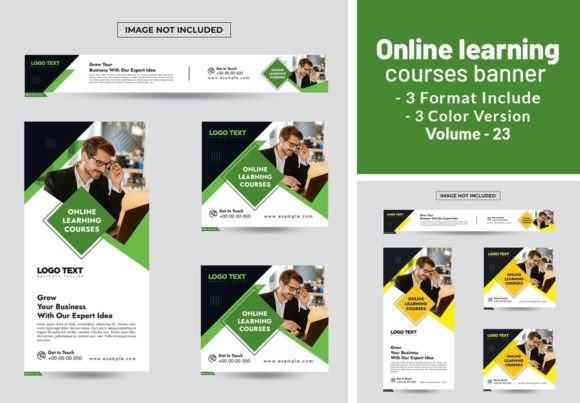
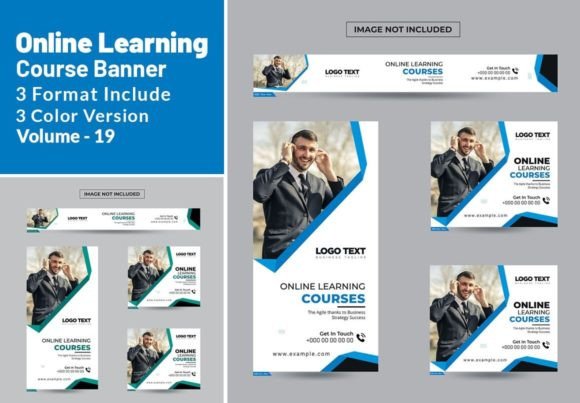
At its core, Online Courses Banner Design V-19 is a collection of premium design assets tailored for promoting educational content. It includes 04 standard banner formats, giving you the flexibility to advertise across different platforms without starting from scratch. The volume contains 19 unique, fully editable files in Illustrator Ai, Eps, and PDF formats. This range ensures compatibility with most professional design software, allowing you to customize every element—from color schemes to layout structure—to perfectly align with your brand identity.
The package includes three distinct color versions, providing a solid foundation for A/B testing or maintaining visual variety across a campaign. While photos are not included, this is a practical advantage. It allows you to insert your own high-quality images of instructors, course materials, or student testimonials, which adds authenticity and strengthens your brand's unique story. The templates are designed with modern typography and clean layouts that prioritize clarity, ensuring your message about course benefits, dates, or special offers is communicated instantly.
Practical Applications for Maximum Impact
The true value of these banner templates lies in their versatility. For a small business owner launching their first webinar series, these files can be quickly adapted to create a cohesive set of Facebook and Instagram ads, website header graphics, and email newsletter banners. The consistent visual language across platforms builds recognition and professionalism. A content creator or blogger promoting an e-book or workshop can use the templates to create eye-catching Pinterest pins or YouTube thumbnails that drive traffic back to their sales page.
For designers and marketers working with clients, this package serves as a significant time-saver. Instead of building every banner from the ground up, you can use the V-19 templates as a robust starting point, customizing them to match a client's specific brand identity. The editable nature of the files means you can adjust the visual hierarchy to emphasize a call-to-action, tweak the font pairing to better suit the audience, or modify the layout to fit a new campaign goal. This efficiency allows you to focus on strategy and messaging rather than pixel-pushing.
Design Details That Make a Difference
When evaluating design assets like the Online Courses Banner Design V-19, it's wise to look beyond the surface. The templates are constructed with readability as a priority. The text placement, sizing, and contrast ratios are considered to ensure that key information is legible even on mobile devices or in fast-scrolling social media feeds. This attention to visual hierarchy guides the viewer's eye naturally from the headline to the supporting details and finally to the call-to-action button.
While the package itself is a set of graphics, the included font information and download links for Google Fonts are a critical detail. Choosing the right typeface is fundamental to the success of any design. The fonts recommended or used in the templates are selected for their clarity and style. For instance, a clean sans serif font for headlines communicates modernity and approachability, while a complementary serif font for body text can add a touch of authority and improve reading comfort for longer descriptions. You have the freedom to explore other creative font pairings that resonate with your specific course topic—perhaps a script font for a creative arts course or a bold, geometric font for a tech-focused program.
Making These Templates Work for You
To get the most out of this resource, start by defining your campaign's goal. Are you building brand awareness, driving sign-ups for a free introductory session, or promoting a limited-time discount? Your objective will guide which template you choose and how you customize it. Use the three color versions to test different emotional appeals—energetic colors for a motivational course, or calm, professional tones for a business training program.
When editing, maintain a balance between customization and consistency. Change the images to reflect your brand, but consider keeping the core layout structure intact. The designers behind these templates have already established a strong visual hierarchy that works. Focus your changes on the elements that make it uniquely yours: your logo, your specific course title, your brand colors, and your call-to-action. This approach ensures your marketing materials are both professional and personalized.
Finally, remember that these are commercial font assets. The licensing terms included in the main file download are essential to review, especially if you plan to use them for client work or large-scale commercial projects. Understanding the usage rights protects your work and ensures compliance. With Online Courses Banner Design V-19, you're not just buying images; you're investing in a flexible, professional system to enhance your digital presence and connect more effectively with your target audience.