MedisCare - Doctor Dashboard V2: Streamlining Patient Care
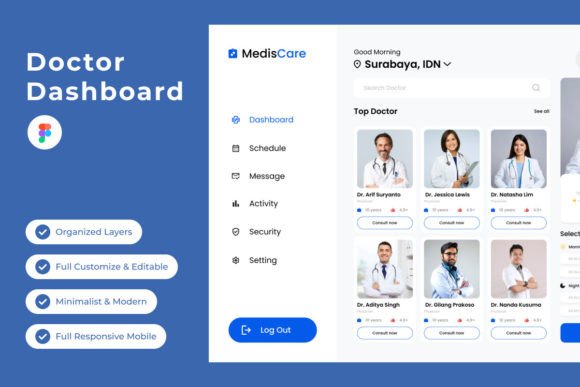
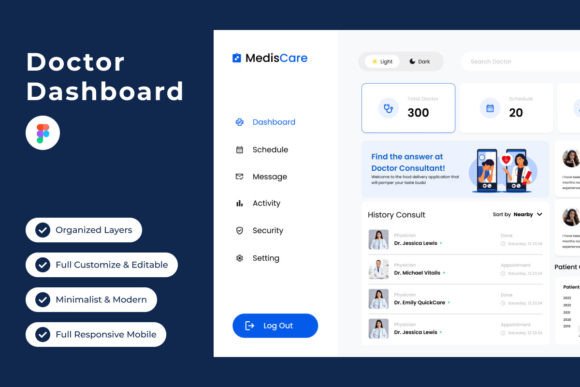
In the fast-paced world of healthcare, efficiency isn't just a convenience; it's a critical component of quality patient care. The MedisCare - Doctor Dashboard V2 template emerges as a direct response to this need, offering a sophisticated digital environment for medical professionals. It moves beyond basic data entry, presenting a visually coherent and functionally robust interface designed for daily use. The dashboard’s personality is one of calm authority and clarity, utilizing a clean sans serif font family for maximum readability across dense patient charts and scheduling modules. Its visual hierarchy is meticulously crafted, using color and spacing to guide the eye from critical alerts to routine information without causing visual fatigue.
A Foundation in Thoughtful Design
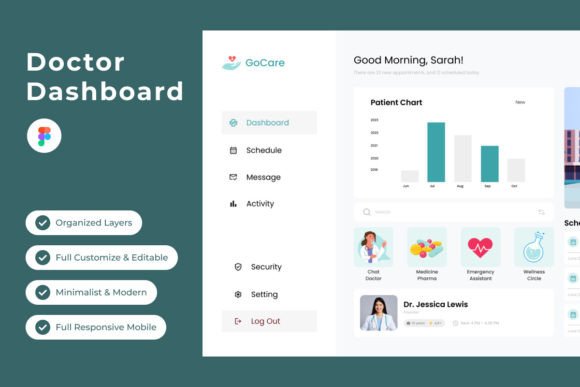
The core appeal of this design asset lies in its organized, intuitive structure. The layout employs a logical grid system that accommodates complex information—appointments, patient histories, analytics, and communications—without feeling cluttered. The color palette is professional yet approachable, using muted tones for backgrounds and strategic accents for interactive elements and key data points. This isn't just a static mockup; it's a functional prototype built within Figma. The layers are meticulously named and grouped, allowing designers and developers to adapt components, adjust global text styles, and modify the color system with remarkable ease. This level of organization transforms the template from a mere visual reference into a true working tool, accelerating the development of a real-world application.
For a healthcare startup or a clinic modernizing its internal software, this template provides a significant head start. It solves the immediate problem of interface design, allowing teams to focus their energy on backend logic and specific feature implementation. The inclusion of both desktop and mobile versions acknowledges the reality of modern medical practice, where a doctor might review a lab result on a desktop computer in their office and later check an appointment schedule on their phone. This cross-platform consistency reinforces a professional brand identity for the software product itself, fostering trust and ease of use among its end-users—the healthcare providers.
Practical Applications Beyond the Clinic
While its primary domain is healthcare software, the design principles embedded in MedisCare V2 have broader applications. The dashboard's approach to data visualization can inform the creation of admin panels for e-commerce platforms, project management tools, or financial software. The clean typography and strategic use of whitespace make it an excellent study in modern typography for web design. Designers can deconstruct its components to understand how to present complex datasets in a digestible format, a skill valuable in editorial design for data-driven publications or in creating clear infographics for marketing campaigns.
For entrepreneurs and small business owners in the health and wellness sector—think boutique fitness studios, nutrition consultants, or telehealth services—the aesthetic of MedisCare V2 offers inspiration. Its visual language communicates professionalism, precision, and care. When developing a brand identity for a related business, one could borrow this dashboard's approach to color and type to build a website, design social media graphics, or create marketing materials that evoke the same sense of reliability and advanced capability. The template serves as a tangible example of how thoughtful design directly supports user experience and operational efficiency.
Making It Work for Your Project
Evaluating whether this design asset fits your project begins with a clear understanding of your goals. If you are building a data-rich application, its structured grid and component library are invaluable. Test its flexibility by attempting to modify a key section within Figma. Can you easily change a primary button color? Are the text styles logically applied? This hands-on test reveals the template's true adaptability. Consider the font pairing strategy used; the consistent use of a single, versatile sans serif typeface ensures cohesion, but you might explore pairing it with a subtle serif font for specific headings or long-form text blocks within your own project to add a touch of editorial warmth.
Remember, the images used in the preview are placeholders. Your project's success will depend on integrating your own high-quality visuals, icons, and data. Use the template's layout as a scaffold, not a cage. Its greatest value is in demonstrating a coherent system for organizing information. By adhering to its underlying principles of clarity, hierarchy, and user-centric design, you can leverage the MedisCare - Doctor Dashboard V2 to build digital products that are not only visually polished but fundamentally effective and a genuine asset to any medical practice.